


Viator Tours & Attractions
4.93.71K Reviews
App Specs
- Version
- 15.27.1
- Updated On
- License
- Free
- Downloads
- 5,000,000+
- Developer
- Viator
- Categories
- Travel & Local
- Platform
- Android, iOS
Screenshots


 Analysis by AppCompare
When I first open a travel-experiences app in a place I don’t know, I want one thing above all: a clear route from browsing to a plan I can actually use. Viator Tours & Attractions is built around finding and booking tours, activities, and tickets, so it can help turn a vague idea—“I’d like to see more than the hotel and the main square”—into something concrete. I’d treat it as a way to compare organized experiences, not as a replacement for maps, local transport information, or independent research.
What to expect when you start browsing
The first useful decision is not which listing looks most exciting; it is what kind of outing fits the day you have. A guided walk, a timed attraction ticket, and a longer excursion can all appear in the same broad travel-planning search, but they solve different problems. I find it helps to begin with a place and a rough time window, then compare options that genuinely fit rather than collecting appealing ideas without checking the practical details.
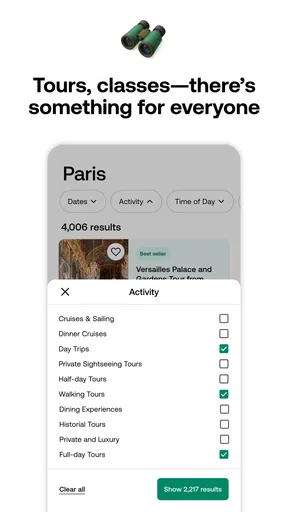
Viator is a Travel & Local app from Viator, with a catalogue spanning more than 300,000 experiences, tours, and tickets. That breadth is useful when I want to explore beyond one familiar kind of activity, but it also means browsing can become its own project. I would narrow the search by destination and the type of experience I want, then use the available filters and listing details to make a manageable shortlist.
It is free to download, rated for Everyone, and has a 4.9 average from around 68,000 ratings, with more than 5 million installs. Those figures suggest it is widely used, but they don’t tell me whether a particular tour suits my pace, mobility, interests, or travel companions. For that, I pay closer attention to the description and traveller reviews of the individual experience rather than treating the app’s overall popularity as a guarantee.
Discovering the Wonders of Viator
Picture this: you've just landed in Paris, and you're overwhelmed by all the must-see spots. You whip out your phone, open the Viator Tours & Attractions app, and voila! You're greeted with an array of tours and activities that make it super easy to plan your adventure. The app’s user-friendly interface means you won’t be fumbling around trying to figure out how it works. Trust me, even if you're not a tech wizard, you'll feel right at home.
Features That Make You Say "Wow"
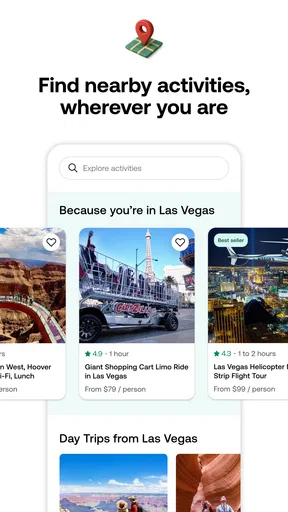
One of my favorite features has to be the personalized recommendations. Based on your location and interests, Viator suggests tours that align perfectly with what you’re into. Fancy a wine tasting in Tuscany or a historical walk in Athens? It’s all just a tap away.
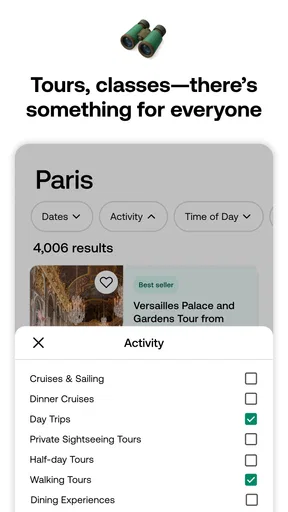
The app also lets you filter by ratings, price, and duration, so you can find exactly what suits your schedule and budget. Plus, the detailed descriptions and user reviews give you a real feel for what to expect. It’s like having a sneak peek without any spoilers.
Worth Reading Before You Choose

EA SPORTS FC Mobile 26 Is a Bigger Football Game, but It Takes Time

Flipboard Shows What News Apps Must Do Beyond the Feed

Switching to Android Auto Means Rethinking Your Driving Routine

Google Calendar Makes a Crowded Week Easier to Manage

Ludo King Makes the Most of the Minutes Between Plans

Baby Panda World Brings Quick Play to Modern Phones, but Its Game Library Feels Busy
Make the first booking fit the day
For a first-time user, I’d start with a simple, specific goal: choose one experience for a free afternoon rather than trying to arrange an entire trip at once. A realistic example is arriving in a city with a few hours before dinner and wanting a guided walk that gives some context without taking over the day. I’d compare the duration, meeting information, and reviews, then check that the start time leaves enough room for getting there. That small bit of planning is more useful than choosing solely by a striking photo or a high rating.
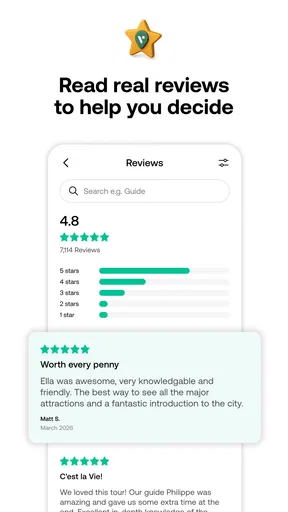
Before committing, I’d read the listing as a practical checklist. Look for what the experience includes, where it begins, how long it lasts, and any stated requirements or exclusions. Reviews are most helpful when they discuss details that matter to you—such as the guide’s explanations, the pace, or whether the meeting point was easy to find. A glowing comment about an experience’s atmosphere may not answer whether it works for someone travelling with children or someone who prefers a quieter outing.
Booking Made Effortless
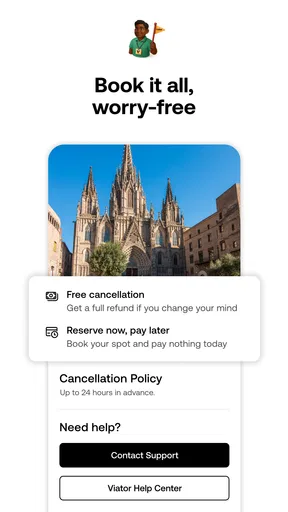
Booking a tour is as simple as ordering a coffee. You just select your tour, pick a date, and boom, you’re set. The app supports multiple payment options, making it convenient no matter where you're from. And if plans change (as they often do), the cancellation policy is pretty forgiving. It’s a relief to know you have options if something unexpected comes up.
I would still pause at the final step and check the selected date, time, and the details attached to that particular booking. Experiences can have different arrangements, so I wouldn’t assume that one listing’s terms apply to another. If flexibility matters to me, I’d read the cancellation information shown for the experience before paying instead of relying on a general impression. That is especially worthwhile when weather, transport, or a packed itinerary could change my plans.
When the app helps—and when it doesn’t
This is a good fit when I want a bookable activity and would rather compare options in one place than search across many individual tour pages. It can also be handy when a travel companion has a different idea of a worthwhile day: filtering for duration or price can bring the conversation down to realistic choices. The trade-off is that a broad catalogue can make it tempting to over-plan. I’d leave some unscheduled time, particularly on a short trip, instead of treating every open slot as something that needs a booking.
If I only need directions, opening hours, or a casual recommendation for a nearby café, a maps app or local guide may be faster. If I prefer to wander without a fixed schedule, I may get more value from a guidebook or a self-guided route. And for a specialist activity, I’d compare the relevant operator’s own information as well as Viator’s listing, since the best choice depends on the details and terms for that particular outing—not just on the convenience of finding it in an app.
Exploring Beyond the Surface
With Viator, you're not just a tourist; you're a traveler who gets to delve deeper into the culture and history of a place. The app connects you with local guides who are not only knowledgeable but genuinely passionate about what they do. It’s like having a friend show you around, sharing stories and insights that you won’t find in guidebooks.
And let’s not forget about the hidden gems. Viator offers unique experiences that go beyond the typical tourist traps. Ever tried a street art tour in Berlin or a culinary class in Bangkok? The opportunities are endless.
One useful way to make browsing less overwhelming is to decide what you want to learn or experience before searching. If I’m interested in food, I can compare a tasting with a hands-on class rather than assuming they offer the same kind of evening. If I want historical context, I’d look for a guided walk whose description matches the period or neighbourhood I care about. This turns the catalogue into a tool for matching an outing to my interests, rather than a stream of unrelated inspiration.
I’d also avoid booking several activities back-to-back just because their listed durations appear to fit. Travel time, queues, meals, and the simple need for a break can make a tightly packed plan feel stressful. A single well-chosen experience can anchor the day, while leaving the rest open for discoveries that don’t need advance booking. For a family or a group, I’d make sure the activity suits everyone’s pace before treating a convenient time slot as a settled plan.
Small checks that prevent bigger hassles
The most common confusion is assuming that a listing’s title tells the whole story. It usually doesn’t. I’d scan the description for the precise meeting point and what is included, then look at recent comments for practical clues. If the location is unfamiliar, I’d check how I’ll get there separately and leave a buffer. A booking confirmation can settle the reservation, but it doesn’t automatically solve the question of how long the journey to the start will take.
Another useful habit is to compare like with like. A lower-priced option may be shorter or include less, while a longer experience may occupy most of the day. Ratings can help identify patterns, but I wouldn’t use a small handful of enthusiastic comments as a substitute for checking the itinerary and conditions. The right choice is the one that matches my actual plans and expectations, not necessarily the one with the most appealing headline.
If something about the activity is essential to my decision—access needs, the language of the tour, or a particular inclusion—I’d look for that detail in the listing before booking. When it is unclear, I would seek clarification through the appropriate booking or operator channel rather than guessing. That caution is not a knock on the app; it is simply sensible when an outing depends on a specific practical requirement.
The Final Verdict
In a world full of travel apps, Viator Tours & Attractions stands out by offering a seamless experience that caters to both spontaneous adventurers and meticulous planners alike. Whether you're a seasoned globetrotter or just dipping your toes into the world of travel, this app is your go-to for making your trips unforgettable.
So, next time you’re planning a getaway, give Viator a whirl. You might just find yourself uncovering the world’s wonders in ways you never imagined. Happy travels!
My practical recommendation is to use it for one clearly defined need first: find a suitable activity, inspect its details, and make sure it fits the day before booking. Once that feels comfortable, browsing more widely can help shape later plans. The app has been available since November 12, 2012, and version 14.28.0 supports devices running iOS 11 or later. I’d keep it as a useful companion for organized experiences, while still using local sources for the everyday questions that tours and tickets do not answer.
Pros
- User-friendly interface enhances navigation.
- Wide range of tours and activities available.
- Seamless booking process with secure payments.
- Detailed descriptions and user reviews.
- 24/7 customer support for assistance.
Cons
- Limited offline access to booking details.
- Some tours may have hidden fees.
- Occasional app crashes reported by users.
- Language support is not comprehensive.
- GPS feature can be inaccurate at times.
FAQs for Viator Tours & Attractions
What is Viator Tours & Attractions?
Viator Tours & Attractions is a mobile application that allows users to discover and book a wide variety of tours and activities worldwide. From guided tours and day trips to unique experiences, the app provides detailed information, reviews, and booking options to enhance your travel plans. It's available for both Android and iOS devices.
How does the booking process work on Viator?
Booking a tour or activity on Viator is straightforward. Users can search for experiences by destination, date, or interest. Once you've found an activity, you can view detailed descriptions, read user reviews, and check availability. The app provides a secure checkout process, allowing you to pay directly through the app with various payment options.
Are there cancellation options available after booking?
Yes, Viator offers flexible cancellation policies for many of its tours and activities. Before booking, you can check the cancellation terms for each activity. Typically, you can cancel up to 24 hours before the start date to receive a full refund, but it’s crucial to verify the specific terms for each booking.
Does Viator offer customer support?
Viator provides robust customer support to assist users with bookings and inquiries. You can reach their support team via phone, email, or live chat through the app. They are available to help with any issues or questions you may have before, during, or after your trip, ensuring a smooth and satisfying experience.
Is Viator suitable for family travel planning?
Absolutely! Viator offers a wide range of family-friendly tours and activities. The app allows you to filter experiences specifically designed for families, ensuring there are options suitable for travelers of all ages. From educational tours to fun-filled adventures, Viator helps families create memorable travel experiences.


